Estimate landed cost per Shopify SKU, not per shipment guess.
LiveTariff Recovery applies per-SKU logic across a catalog because duty depends on the product's HTS code, country of origin, declared value, and entry date. It itemizes each represented layer against the official record instead of collapsing a catalog into one blended percentage.
Available on Shopify: this workflow is part of SkuWatch Tariff Recovery. The current app produces estimates, review states, recovery drafts, and finance CSVs; it does not change products, prices, orders, or checkout charges.
- Search intent
- Shopify merchants who need a per-SKU landed-cost figure before repricing, reordering, or quoting.
- Workflow input
- Product or confirmed HTS code, country of origin, declared value, and the entry date that determines which measures are in force.
- Workflow output
- An estimated landed cost and effective duty rate per SKU, with base duty, additional measures, and CBP fees itemized and linked to their sources.
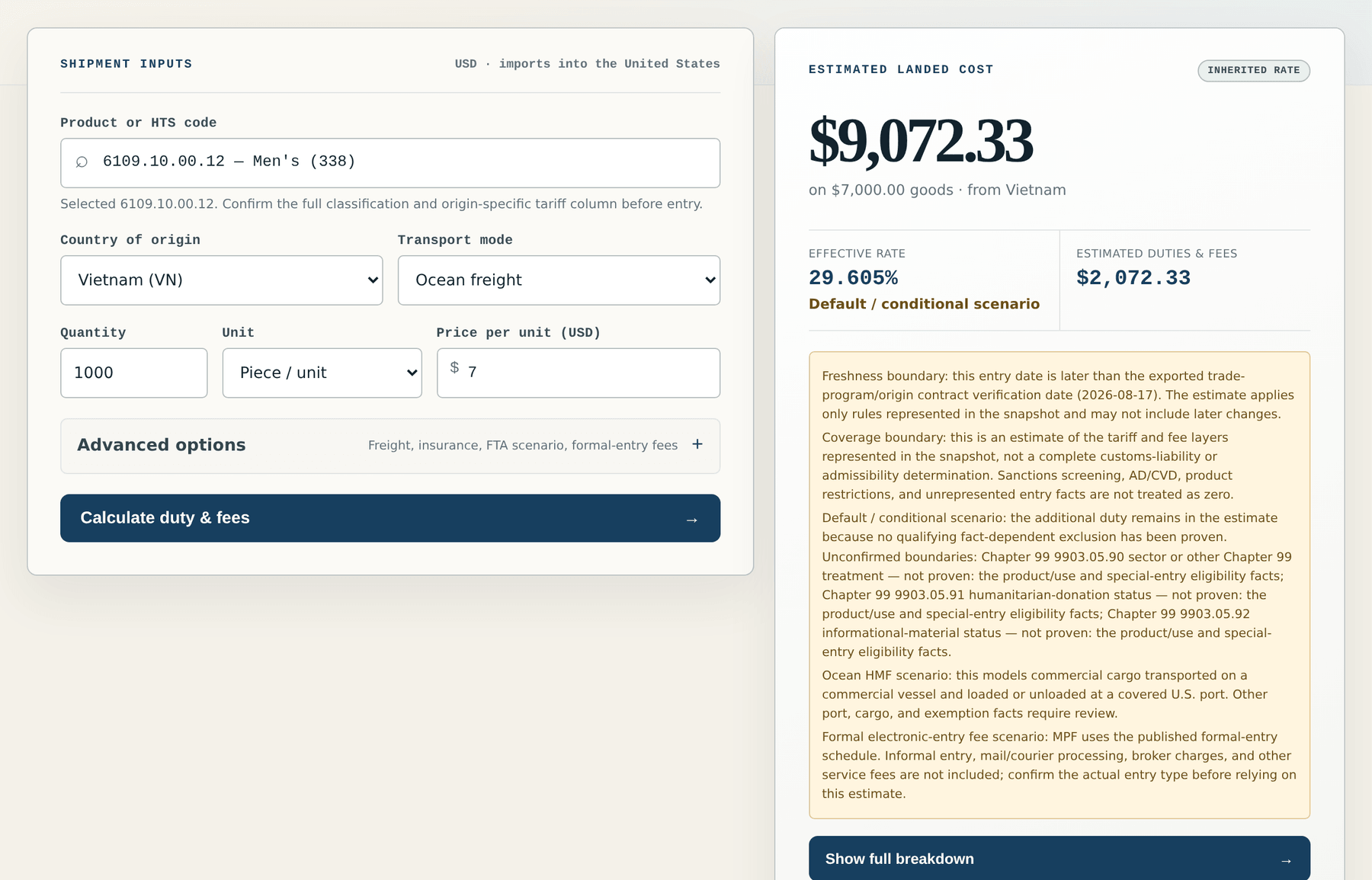
Per-SKU landed cost from product facts, origin, value, and entry date
The reason a catalog-wide tariff percentage misleads is that duty is not assessed on catalogs. It is assessed per entry, on a classified good, from a specific origin, at a declared value, on a date. Change the origin and the additional measures may disappear. Move the entry date past an effective date and a layer switches on. Tariff Recovery keeps those four inputs visible per SKU rather than averaging them away.
Each estimate is meant to break into lines you can check independently:
- Ordinary duty. The general rate associated with the product's HTS heading in the current published schedule.
- Additional measures. Any further duties in force for that origin and heading on the entry date, itemized separately rather than folded into one rate.
- CBP fees. Broken out on their own lines, because they follow different rules from duty and different thresholds.
- Effective rate. The total expressed against declared value, so the estimate can be compared against a margin target.
This is an estimation tool, not a filing tool and not customs advice. It does not clear entries, does not guarantee HTS accuracy, and does not account for facts it was never given, including trade-program qualification, exclusions, valuation adjustments, and entry type. Confirm material decisions against the official record.
The public U.S. import-duty and landed-cost calculator runs the same logic for a single scenario without a Shopify connection, and the methodology page documents source precedence and calculation limits.
How the per-SKU estimate works
Catalog facts, official tariff evidence, and estimates stay separated so unresolved inputs are visible before a decision.
Fix the four inputs
Take the confirmed HTS code, the country of origin, the declared customs value, and the entry date. An estimate is only as good as those four facts.
Apply the duty layers separately
Apply the ordinary duty for the heading, then any additional measures in force on that entry date for that origin, then CBP fees, each shown as its own line.
Show the source behind each line
Link every layer to the published record it came from, so a number can be checked rather than trusted.
Live app, source-linked tariff data
The duty layers, fee logic, and schedule revision behind the public calculator are the current published snapshot. Tariff Recovery carries the same evidence into SKU-level estimates and excludes unresolved amounts from totals.
2026 HTS Rev 19 · synced · Operational
Inspect data and calculator status →Frequently asked questions
Is the Shopify tariff calculator available to install?
Yes. Install SkuWatch Tariff Recovery from its official Shopify App Store listing. The public calculator also remains free for a single scenario and needs no account or store connection.
Why does the entry date change the estimate?
Tariff measures have legal effective dates, and the layers in force on the date of entry are the ones that apply. Two identical shipments entered weeks apart can carry different duty totals.
Is the result an official duty amount?
No. It is an estimate built from the published schedule and the facts you supply. Classification, valuation, origin, entry type, and exclusions all change the real outcome, and SkuWatch does not provide customs advice.
Reference information only, not customs, legal, tax, or classification advice. SkuWatch does not guarantee HTS accuracy or a final duty amount; confirm material classifications and entry facts before acting.